


How to set up two-factor authentication on Instagram
In this tutorial we will explain how you can set up two-factor authentication on Instagram. It’s one of the most, if not the most, important steps to secure your Instagram account. There are two ways to enable 2 step verification; via your phone number & a third party authentication app. We always recommend to use Google Authenticator (or another authentication app) & not your phone number, due potential “SIM swap scams” (see: Wikipedia).
How to set up two-factor authentication using Google Authenticator
- Open the Instagram application on your mobile device
- Go to your Instagram profile by clicking on the profile icon at the bottom right corner
- Select the 3 lines icon in the top right corner
- Select ‘settings’
- Select ‘security’
- Select ‘Two-Factor Authentication’
- Select ‘Get started’
- Select ‘Authentication App’
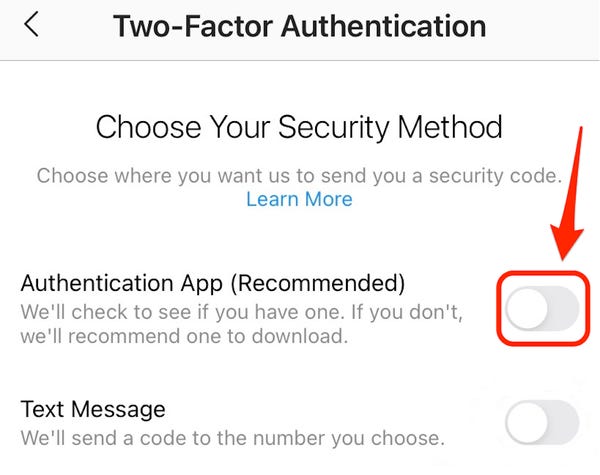
- Download Google Authenticator (Apple or Android) & click on ‘next’
- A pop-up will take you to the Google Authenticator app & asks you for the code
- Copy the code from the Google Authenticator ap & return to the Instagram app.
- Paste the code into the text field & submit
- You’re registered with the third-party app. Instagram will ask for the code from the Authenticator app, any time you log in. This will prevent hackers from getting into your account, as they will need to provide an extra code.
- Make sure you don’t lose access to the authenticator app & make a backup of your phone. In this case you won’t lose access to the code, in case anything is wrong with your phone (stolen, defect, etc.)
Related Articles
AI Instagram Influencers: A Complete Guide

A friend asked me if AI influencers actually make money. Short answer, yes. Here's how they work and how to build one.
Instagram Growth Hacks That Still Work in 2026
You've probably read ten Instagram growth guides that all say the same thing. Here's what's actually working right now, in 2026.
How to Get Real Instagram Followers Organically
I've helped dozens of creators grow their following the slow way. Here's what actually worked, without bots or shortcuts.
Why Am I Losing Followers on Instagram? (And How to Fix It)
Your follower count keeps dropping and you can't figure out why? Here's what actually causes it, and the exact steps to turn it back around.
How to Remove a Shadowban on Instagram: Step-by-Step Guide
There’s usually no warning email or clear message from Instagram if your account gets shadowbanned. One day, your content is reaching p...
Instagram Ban Wave 2026: Users Report False Bans as Meta Expands Moderation
Since mid-May, we at SwapSocials have seen an increasing number of people looking to buy an Instagram account after their main account ...

How to Create an Instagram Business Account in 2026
I’ve helped plenty of people switch to Instagram business accounts. Here’s what I tell them about the process, what changes, and what doesn’t.
How to Change Your Instagram Name
Confused between your Instagram display name and your handle? Here's exactly how to change both in 2026, step by step.

Instagram Username Ideas for Every Niche
I've helped creators pick Instagram usernames that grow with their brand. Check out these naming rules, niche ideas, and backups for 2026, all in one place.
How to Verify Your Instagram Account: Detailed 2026 Guide
After most of my clients got approved, I noticed what usually works and what doesn't. That's what this guide is based on.
How Much Can You Earn With 100K Instagram Followers?
Ever wondered what 100K Instagram followers earn in 2026? Here is a simple breakdown of creator income, niche rates, and pricing tips.
Can You Buy Followers on Instagram? Pros, Cons, and Risks
I've helped hundreds of accounts safely increase their following. Here's what actually happens to your account in 2026, risks and all.

