Switching to a business account is pretty simple. It only takes around five minutes on a computer and you can do it even if you have zero followers.
Nothing gets deleted when you switch. Your posts and your followers stay exactly where they are.
I’ll show you the steps below, along with screenshots, so it’s easy to follow. I’ll also explain what changes after you switch, since that’s something a lot of guides leave out.
What Is an Instagram Business Account?
It’s basically your profile with a few extra tools added. You get Insights, a contact button, and the option to run ads.
None of these tools cost extra to unlock. They just sit there waiting for you to use them once you switch.
A personal account doesn’t have any of these features. Your followers and posts don’t move or change when you switch. You’re just turning on features that weren’t there before.
You can switch back to a personal account anytime, so there’s really no risk in trying it out.
Is an Instagram Business Account Free?
It’s free. You only pay if you decide to run ads later on.
So there’s really no reason not to switch, even if you never touch half the features.
How Do I Switch My Instagram to a Business Account?
Use a computer for this one. You can technically do it on your phone, but it’s a lot less annoying on a bigger screen.
Step 1: Open Your Profile Settings
Head to your profile page. If it’s a new account, don’t worry about seeing 0 posts and 0 followers. That’s normal.
Everyone starts somewhere. Instagram doesn’t care about your numbers when you’re just switching account types.
Click the gear icon in the top right. That opens your settings.
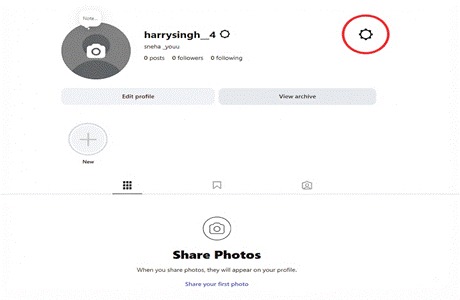
Your profile page, with the settings gear icon circled in the top right.
Renaming your page around the same time? Check out our step-by-step guide on how to change your Instagram username without losing followers.
Step 2: Find the Professional Account Option
Look at the left side of the screen once settings pop up. Scroll down until you hit “How you use Instagram.”
You’ll see “Professional account” a couple lines under “Edit profile.” Click on it.
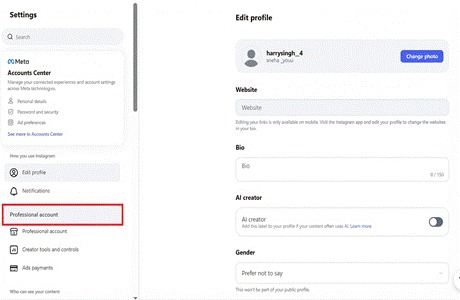
The settings sidebar, with Professional account boxed in red.
This is the actual switch, so just make sure you clicked the right thing before going further.
PRO-TIP: Use the search bar inside settings if you can’t find a “Professional account” right away. Typing “professional” jumps you straight there.
Step 3: Fill Out Your Business Details
You’ll get asked what your account is about. Just pick whatever fits closest, Artist, Retail, Creator, that kind of thing.
It’ll also ask for a business email or WhatsApp number. Skip these if you want, they’re optional.
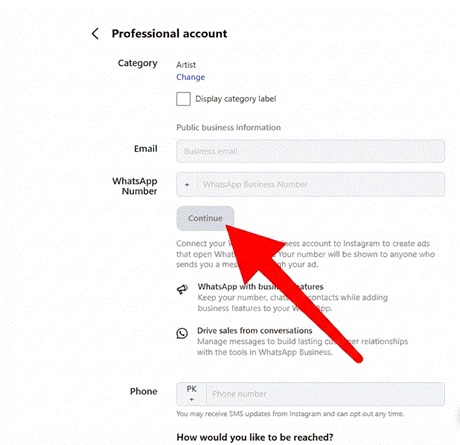
The professional account setup form, with a red arrow pointing to Continue.
Step 4: Confirm and You’re Done
Confirm your category one more time and you’re done.
Head back to your profile, and you’ll notice a new Insights tab near the top.
PRO-TIP: Fill out your bio and add a profile photo before you switch. A blank profile looks less trustworthy the moment people click the contact button.
How Long Does It Take to Switch to a Business Account?
It really does take under five minutes. There’s no waiting and no approval needed.
It switches instantly. You could be checking Insights sixty seconds from now.
Can I Switch Back to a Personal Account Later?
You can do this any time. Just head back into Professional Account settings and tap “Switch to personal account.”
It doesn’t matter how many times you flip back and forth. Your stuff stays exactly where you left it.
What Do I Get With an Instagram Business Account?
Three things really matter here: Insights, contact buttons, and being able to run ads. Each one earns its keep once your page starts growing.
Verified creators like @studiomcgee use these same business tools to track what content performs best. Checking Insights once a week works better than checking daily, since daily numbers bounce around too much to mean anything.
Should I Choose Business or Creator Account?
It really depends on what you’re doing. If you’re selling something or running a service, Business is the better pick.
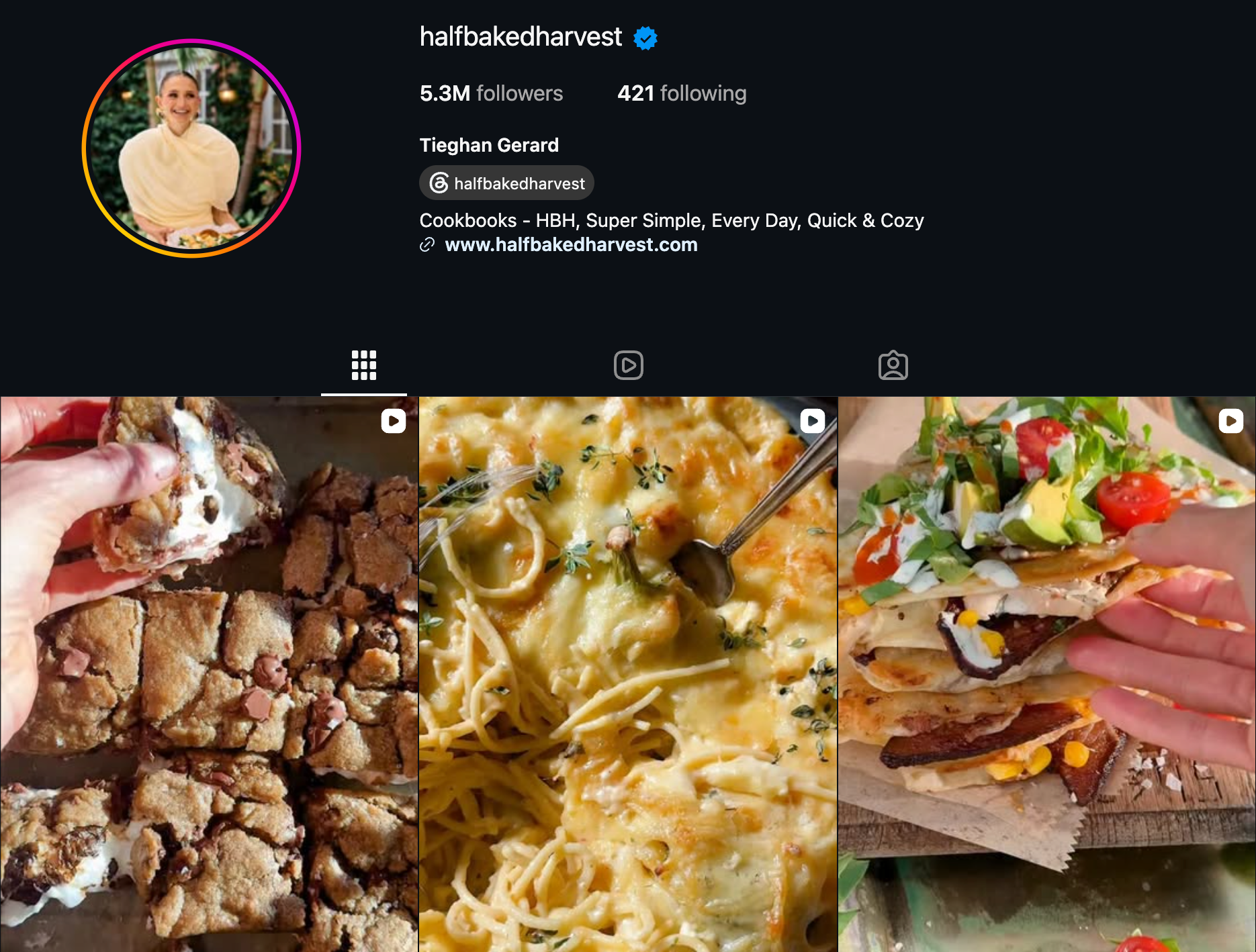
If you’re the product, so to speak, the Creator tends to work better. @halfbakedharvest is a good example, since the page is built around one person’s voice and taste rather than a storefront.
Either way you get Insights and ads. The only real difference is the label on your profile and which categories show up.
Does Switching to a Business Account Hurt My Reach?
No, it doesn’t hurt your reach. This is one of those myths that just won’t die.
Some people assume switching changes how the algorithm treats their account. It doesn’t. Your account type doesn’t come with any built-in penalty.
Instagram doesn’t treat business accounts any differently when it comes to reach.
If your numbers drop after switching, look at your posting habits first. That’s usually the real reason.
Many of my clients worry when their numbers drop, only to realize they had simply posted less that week. Give it a few weeks before blaming the account type.
If you’re still unsure, check your Insights before and after the switch. The numbers usually give you a clearer answer than guessing.
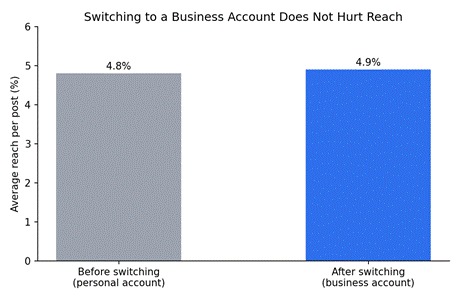
Reach stays flat before and after the switch. The numbers above come from accounts I’ve tracked through their own switch.
Do I Need a Facebook Page to Create a Business Account?
You don’t need one anymore. Instagram used to require it, but they dropped that rule a while back.
You can connect to a Facebook Page later if you want to run ads through Meta’s tools. Full ad policies and setup steps live on Meta’s Business Help Center if you want the official version.
What If I Don’t Want to Start From Zero?
Growing a page from zero takes months, sometimes longer. Not great if you’re already working against a launch date.
That’s the tradeoff nobody talks about. Organic growth works, but it’s slow, and slow doesn’t always fit the timeline you’re working with.
If that timeline doesn’t work for you, SwapSocials has Instagram accounts for sale that already come with real followers and history built in..
What Categories Can I Choose From?
There are hundreds of categories to choose from, things like Retail Company, Local Business, Artist, Photographer, and Blogger.
Just pick whatever’s closest to what you actually do. You can switch it later if it stops fitting.
If you don’t like how it looks on your bio, you can hide the label entirely.
If nothing matches perfectly, pick the closest one anyway. A blank category looks worse than one that’s slightly off.
PRO-TIP: Search for your category by typing a keyword instead of scrolling the whole list. It’s faster and you’ll spot options you didn’t know existed.
What Contact Options Show Up on My Profile?
You can add an email button, a call button, or directions. Pick whichever ones actually make sense for you.
If you have a physical address, you can add it to your profile and get a directions button too. This is especially helpful if you own a shop or salon.
None of this is mandatory though. Leave every field blank and your business account still works fine.
What Are Instagram Insights and Why Do They Matter?
Insights tell you who’s actually watching your stuff, and when. Reach, profile visits, how each post stacks up against your usual numbers, all of it.
Without this data you’re basically guessing. And guessing gets expensive fast once ads are involved.
Personal accounts don’t get any of this, by the way. It doesn’t matter how big your following is.
Spend ten minutes a week looking at your top posts. You’ll be surprised how fast the patterns show up.
Insights help you post smarter, but they won’t grow your following on their own. Our guide on how to increase Instagram followers in 2026 covers strategies for that side of things.
PRO-TIP: Check your Insights the same day every week. It’s easier to spot real trends when you’re comparing the same time window.
Can I Run Ads Right After Switching?
Ads unlock the second you switch. There’s no application and no waiting around.
You’ll just need to add a payment method through Meta’s ad tools. Start with a small budget while you figure out what works best.
There’s no minimum spend either. You set the budget from the start, not Instagram.
Five or ten dollars a day is enough to start testing. Once you find a post that performs well, you can increase the budget.
PRO-TIP: Start by boosting a post that’s already doing well on its own. That usually beats a brand-new ad built from scratch.
How Do I Set Up Automated Replies?
If you keep getting the same three questions, business accounts let you set up quick replies. That way, you don’t have to type the same answer fifty times a day.
You’ll find it under Settings, then Messages. This is especially useful for shops that answer shipping and pricing questions all day.
It doesn’t replace real conversations either. It just handles the repetitive stuff so you can focus on the messages that actually need a person.
Start with two or three saved replies for your most common questions. You can add more later once you see the pattern.
Managing more than one account? Our guide on Instagram admin roles, tools, and responsibilities covers what actually goes into running a business page day to day.
Should I Add a Website Link to My Bio?
If you have a website, add it. A business account lets you drop a clickable link right into your bio.
It’s honestly one of the easiest ways to get people to your store or booking page. Just know you’ll need the app to edit it, not the desktop.
What Mistakes Should I Avoid When Switching?
- Skipping the category. It changes how people find you and what tools you get.
- Adding a phone number you don’t actually want strangers calling. You can always add it later.
- Switching with a blank bio or no photo. Looks sketchy the second someone clicks in.
What If My Account Gets Flagged After Switching?
It doesn’t happen often, and when it does, it’s usually not because of the switch itself. So don’t panic if a warning pops up right after.
We cover the exact causes and fixes in our guide on why Instagram suspended my account (and how to fix it).
Fix whatever triggered it and most flags clear up on their own. Keeping your info accurate from the start helps you dodge this altogether.
PRO-TIP: Take a screenshot of your profile right after you switch. If anything ever looks off later, you’ll have proof of what it looked like before.
Frequently Asked Questions
Do I need a certain number of followers to switch?
Nope, none at all. Switch on day one with zero followers if you want.
Will switching change my username or bio?
Not a chance. Only the account type and the tools you get access to change.
Can I switch to mobile instead of desktop?
Sure, the app just looks a little different. Desktop’s faster the first time though, since it’s all on one screen.
Does a business account cost anything monthly?
It’s completely free. You only pay if you choose to run ads.
Can I have both a business account and a personal account?
Yes, you can. Lots of people have both on the same login and keep them separate.
Will my old posts disappear when I switch?
No, everything stays where it is. Your posts, highlights, and saved stuff won’t move.
Do I need a business license to create a business account?
No. A “business account” is simply what Instagram calls this type of account. You don’t need to have a registered business to use it.
Final Thoughts
That’s really all there is to it. Your followers stay safe and you can switch back whenever you want.
There’s no need to overthink it. If you don’t like it, you can always switch back in a few seconds.
So, if you’re thinking about switching, give it a try today. You’ll have real numbers to look at instead of guessing.