Your Instagram name consists of two different things, not just one.
Most people only think about the bold text on their profile. But that’s only half of it.
The other one is your @handle. It’s the part that links to your account. If you mix them up, you might end up changing the wrong one.
Below, I’ll show you how both work and how you can change your instagram name in minutes.
What Is the Difference Between Your Display Name and Username?
Your display name is the bold text on your profile. You can use spaces and emojis in it. It also shows up when people search. Your username is your @handle. It’s what people use to tag you, and no one else can use the same one.
● Display name allows spaces, emojis, and repeated words
● Username has to be one of a kind
● Search mostly looks at your display name, not your handle
That’s why the two fields feel so different. One is made for people to read. The other has to point to just one account, so it stays strict.
Once you know which field does what, it gets easy to pick the right one.
Pro Tip: Put your main keyword in your display name. Your username doesn’t help much with search.
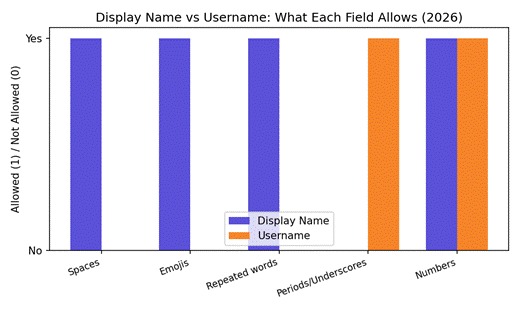
Chart: what each field allows. Display names are far more flexible than usernames.
How Do You Change Your Instagram Name in 2026?
Open Edit Profile and tap on Name near the top. Type in whatever you want, then hit save. That’s really all there is to it and the whole thing takes about two minutes. Just know Instagram only lets you do this a couple of times in a short period, so pick something you’ll stick with.
● Open your profile and tap Edit Profile
● Tap Name, above your username
● Type your new name, then save
Edit Profile is where almost every change starts on Instagram. The Name field sits right at the top, so it’s easy to find.
The update shows up everywhere the moment you save it on your posts, your comments, everywhere your profile appears.
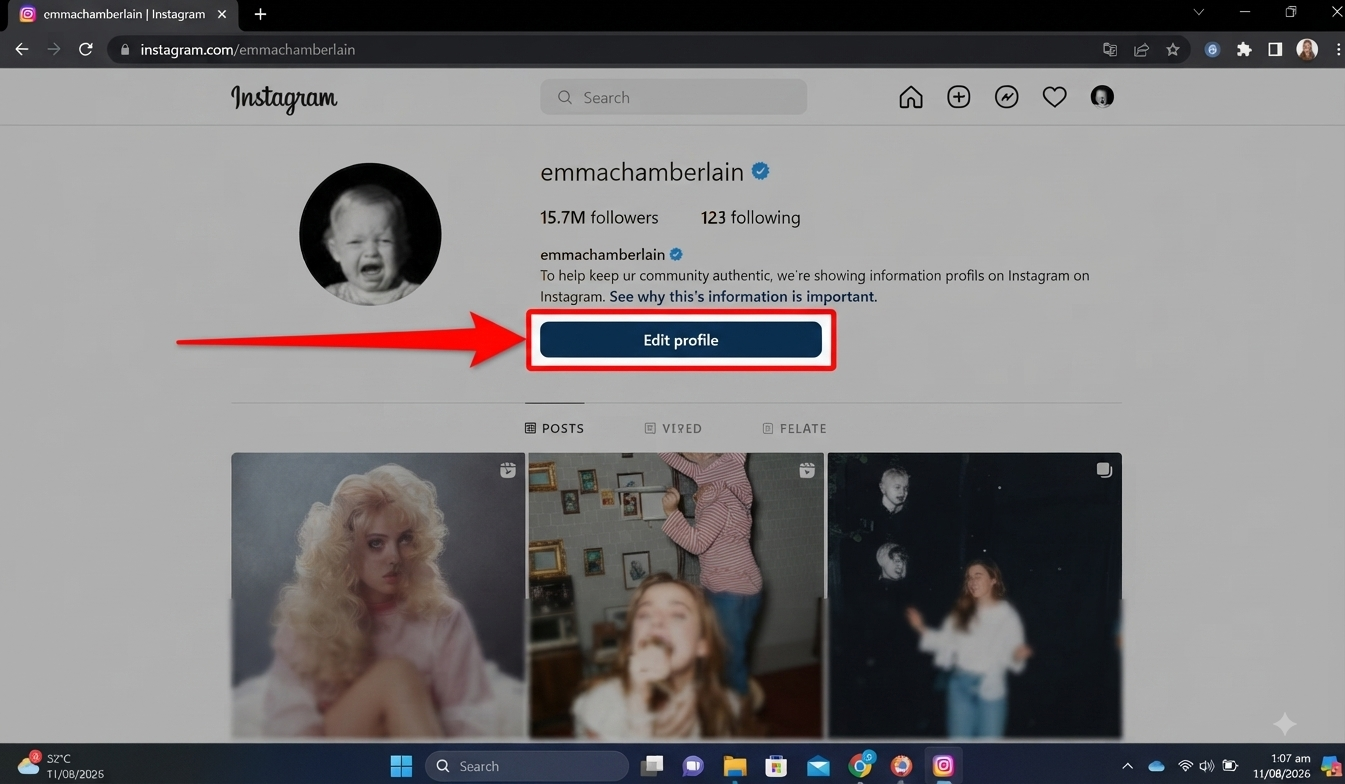
This is exactly what it looks like on a profile like emmachamberlain, where the Edit Profile button sits right under the bio.
Pro Tip: Keep it under 30 characters. Long names get cut off on small screens.
How Do You Change Your Instagram Username (@handle)?
Your username has stricter rules. You can only use letters, numbers, periods, and underscores. As you type, Instagram tells you right away if it’s free. If it’s taken, it shows you some close options. Pick one and save.
● Go to Edit Profile and tap Username
● Clear the box and type your new handle
● Check it’s available, then save
The strict rules exist for a reason. Your username is also your profile link, so spaces or symbols would break it.
That’s also why it checks availability right away. Two accounts can never share the same handle.
Pro Tip: Search your new handle on other apps too. A matching handle is easier for people to remember.
How Do You Change Your Instagram Name in the Meta Accounts Center?
Meta now handles both fields in one place, called Accounts Center. Name and Username each get their own row. Go to the Accounts Center from your settings, tap Personal Details, then Name. You can pick if the change is just for Instagram, or for every linked app.
● Open Accounts Center from your settings
● Tap Personal Details, then Name
● Pick Instagram only, or all linked apps
Meta built this for people who use Instagram along with Facebook or Threads. You can change your name once, instead of doing it in three different apps.
That convenience also causes mix-ups. Name and Username sit right next to each other, so it’s easy to tap the wrong one.
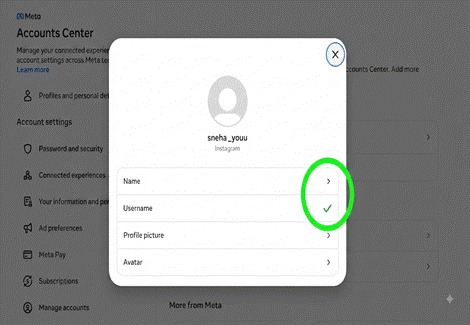
The screen above shows this on a real account, where Name and Username sit as two separate rows inside the Accounts Center.
Name and Username live in separate rows inside the Accounts Center. Don’t confuse the two.
Pro Tip: Go slow here. Name and Username sit right next to each other, so it’s easy to tap the wrong one.
Why Does Instagram Sometimes Block a Name Change?
Instagram only lets you change these fields a couple of times every two weeks. That’s on purpose. It stops people from copying others. If your account was flagged recently, even a normal change might get delayed a bit.
● Too many changes get you a short lock
● Flagged accounts may see delays
● Business accounts sometimes get extra checks
This limit is there for a reason. Without it, someone could copy a popular account’s name, fool people, and then change it back.
The lock usually clears on its own after a couple of weeks. You don’t need to contact anyone. Waiting it out is genuinely the fastest fix.
Pro Tip: Pick your final name before you start. Trying out different options is what triggers the lock.
How Does Your Name Affect Search Visibility on Instagram?
Instagram search mostly looks at your display name, not your username. If your bold name has clear keywords, you show up more in related searches. Names people already recognize also climb faster the next time someone starts typing.
Creators like feelgoodfoodie get this right. Her display name spells out exactly what she posts about, so it keeps matching what people search for.
Accounts like ryantrahan show up fast too. His name gets searched often, and Instagram remembers that pattern the next time someone starts typing.
● Keywords in your display name help you get found
● Usernames matter more for tagging, not search
● Skip symbols that hide your keywords
This is the part most people miss. They spend time on a clever username, then leave their display name blank. That’s what the field search actually reads.
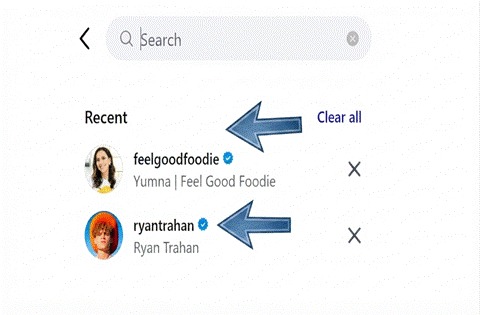
Search results favor accounts with clear, keyword rich display names.
Pro Tip: Changed your niche? Update your display name to match it. It’s the fastest way to show up more in search.
A stronger display name also helps once people find you. Pair it with our tips on how to get more likes on instagram to turn that extra visibility into real engagement.
How Do You Check an Account’s History Before Renaming It?
This matters most if you bought an account or took over an old one. Open the profile, tap the three dots, then About This Account. You’ll see when it joined, its past usernames, and its location. Checking this first keeps you safe.
Open a profile, tap the three dots, then About This Account. You’ll see the join date and past usernames right there.
● Look for a lot of past username changes
● Check when the account was made
● Make sure the country matches what you expected
Here’s why this step matters. A rename hides nothing about the account’s past, but it can confuse followers who remember it under a different name.
If you’re taking over an account someone else built, this history tells you if anything looks off before you make it your own.
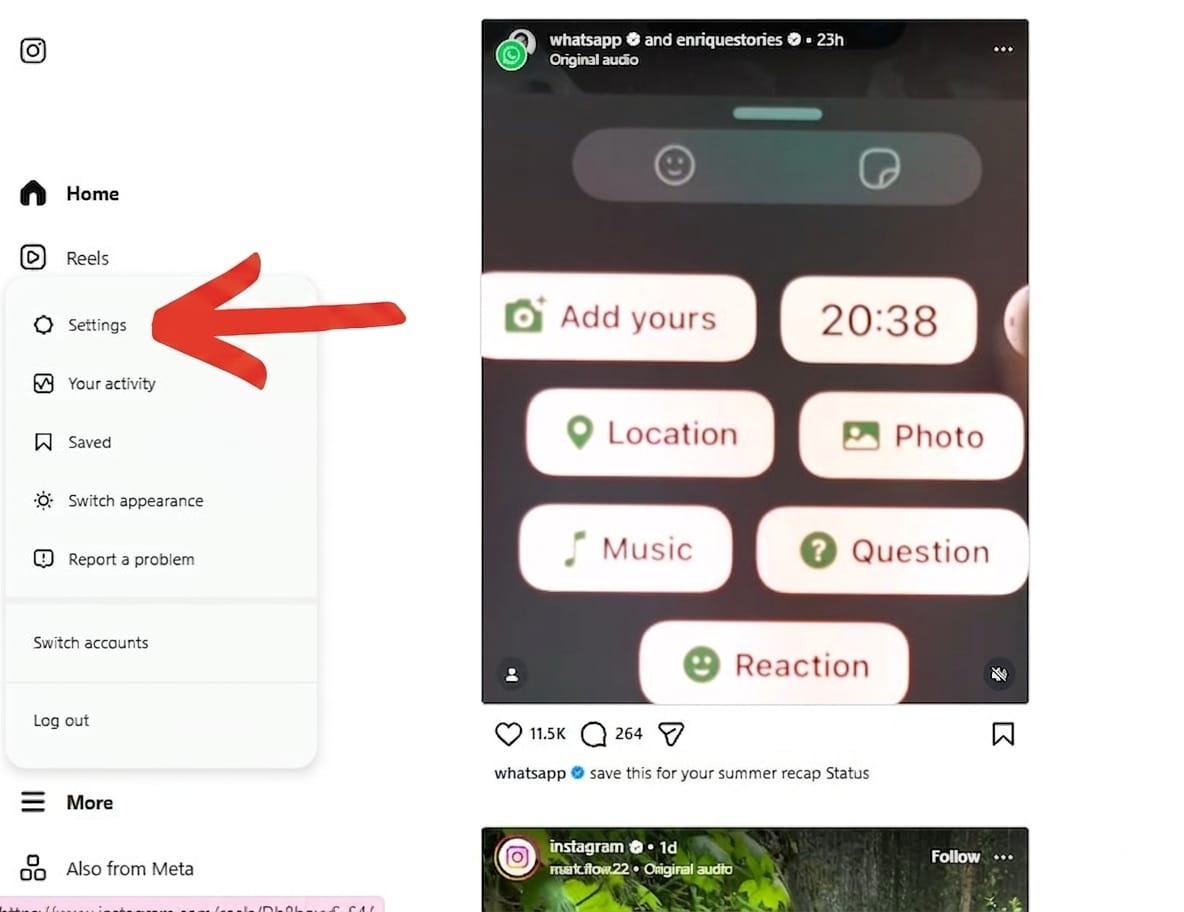
Instagram settings menu where you can access your profile options.
Pro Tip: Didn’t grow the account yourself? Always check its history first.
Check out our step-by-step guide if you’re not sure how to change your instagram username the right way, without breaking your old links.
What Happens to Your Old Username After You Change It?
The moment you save your change, your old username is up for grabs. Instagram doesn’t hold it for you. Any old link pointing to it stops working once someone else takes it. Update your bio, your email, and anywhere else you shared it.
● Old handles can get claimed within hours
● Update your bio link right away
● Old saved links may lead to someone else’s page
This catches people off guard, since Instagram doesn’t warn you first. The moment you hit save, someone else can grab that handle.
That’s how creators quietly lose traffic. An old link sitting in an email signature keeps pointing nowhere useful, and nobody notices for weeks.
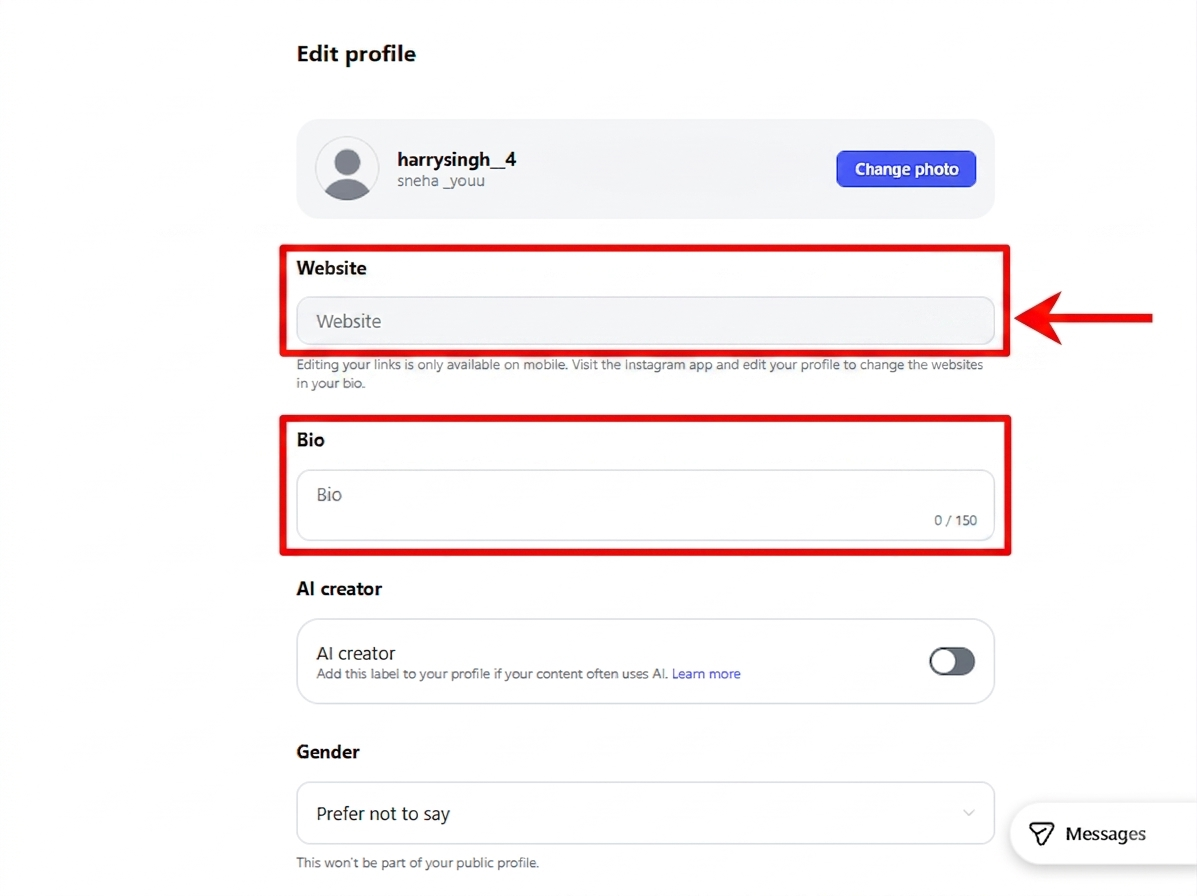
Edit Profile page showing where to update your bio and website links.
Pro Tip: Take a screenshot of your old username first. It’s a small habit that can save you trouble later.
Renaming a verified account works a bit differently. Read our guide on how to get verified on instagram before you touch that name.
How Do You Pick a Good Username in 2026?
A good username is short and easy to say out loud. Try to skip random numbers if you can. They just make you harder to remember. Stay close to your real name or your niche, and keep it simple.
● Try to keep it under 15 characters
● Skip random numbers unless they mean something
● Say it out loud. Hard to say means hard to remember
● Check it’s free on other apps too
Think about how people actually find you. If a friend recommends your account out loud, a name full of numbers is hard to repeat.
A clean handle also travels well. It works the same on a business card, a shirt, or a link in someone’s bio, not just inside the app.
Pro Tip: If your real name is taken, add your niche instead of a number. It reads better and it still helps with search.
Common Mistakes People Make When Changing Their Name
Most mistakes happen when people move too fast. Someone changes their username but forgets to update their bio link. Or they pick a name already used somewhere else, which just confuses people. A little planning avoids most of this.
● Forgetting to update the bio link after
● Picking a name used on other platforms already
● Using symbols that make the handle hard to type
● Skipping the history check before renaming
● Changing both fields at once without checking either one
Most of these mistakes happen when you rush. Just slow down, check each field separately, and you’ll avoid most of them.
Taking a few extra minutes to check can save you a lot of trouble. Skip it, and you could end up with a locked account or a broken link that no one notices for weeks.
How Do Business and Creator Accounts Change Their Name?
Business and Creator accounts follow the same steps as any other account. The good part comes after you save. Your ads, shopping tags, and partnership tools stay connected. None of that breaks just because you changed your name.
● Ads keep running the same as before
● Shopping tags stay connected
● Branded content tools don’t need to be redone
This works because Instagram ties those tools to your account, not your name. Change the name, and everything underneath keeps running fine.
The only thing that shifts is what customers see. People searching your old name may still land on old posts through tags, and that fades naturally within a week or two.
Pro Tip: Update your website and email footer the same day you rename. People notice mismatched names fast.
Frequently Asked Questions
Can I change my name without losing followers?
Yes. Your follower count doesn’t change at all. Only your name and handle update, and every follower stays connected to your account.
How many times can I change my username?
Usually a couple of times every two weeks. That limit exists to stop people from copying other accounts, so business accounts sometimes need extra checks too.
Does changing my username affect old posts?
Your posts and tags stay right where they are. Instagram just swaps the link that points to them, so nothing gets lost.
Is it safe to rename a recently bought account?
Check its history first. If the join date and past usernames match what you were told, go ahead and rename it.
Do Instagram and Threads share the same username?
Mostly, yeah, they’re connected through the Accounts Center. It still comes down to who grabbed the handle first, so double check before you assume it’s free.
Will changing my name affect my ads or shopping tags?
Both stay tied to your account itself, not your name, so a rename won’t break either one.
Quick Checklist Before You Change Your Name
Run through this short list before you change anything. It takes two minutes, and it helps you skip the common mistakes. Save it, screenshot it, or just keep it open while you make the switch..
● Pick your final display name and username together
● Check it’s free on Instagram and other apps
● Screenshot your current profile first
● Check the account’s history if it isn’t yours originally
● Update your bio link right after saving
● Post the change to your Story so people notice
Most of these steps take under a minute each. Together, they’re what separates a smooth rename from one that leaves broken links behind.
Pro Tip: Save this list as a note. It works every time.
Final Thoughts
Changing your Instagram name is simple once you know the two fields. Your display name helps people find you, and your username is your actual link.
Get both right, update your links right after and your profile stays clear for everyone already following you.
Run through the checklist above before you start. It’s saved plenty of people from a locked account or a broken link that sat unnoticed for weeks.
Give it a day or two after the change. Search results and tags should update soon, and things will go back to normal.
Want the rules straight from the source? Check Meta’s Instagram Help Center. It covers account naming and profile settings in full.